HP DeskJet 3755 Manual — Setup, Troubleshooting & Cartridge Guide
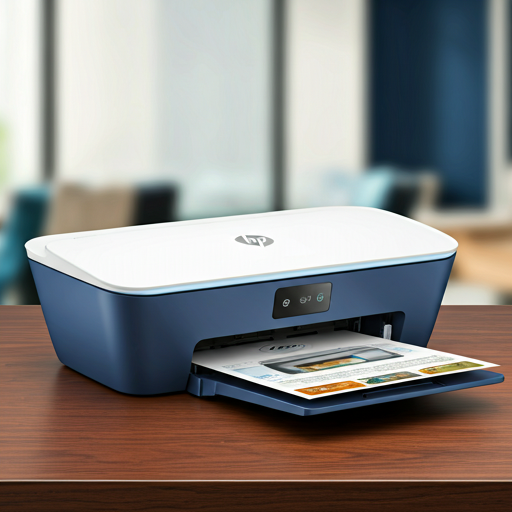
The HP DeskJet 3755 is a compact all-in-one inkjet printer designed for home use, offering wireless printing, scanning, and copying in one of the smallest footprints available in its class. It uses HP 63 and HP 63XL ink cartridges and supports mobile printing via Wi-Fi Direct. This page covers setup instructions, cartridge maintenance, troubleshooting tips, and full technical specifications.
Product Setup
Load Paper into the Input Tray
Raise the input tray and input tray extender, then insert a stack of paper with the short edge down and the print side facing up. Slide the paper-width guide snugly against the edge of the paper, then pull out the output tray and lift the paper catch.
Install the HP 63 Ink Cartridges
Open the cartridge access door and wait for the print carriage to move to the center. Remove the plastic tape from each cartridge using the pull tab, then slide each cartridge into the correct slot at a slight upward angle until it clicks into place. Close the cartridge access door.
Connect to Your Wireless Network
Press the Wireless button on the control panel to enable Wi-Fi. Use the HP printer software or the Wireless Setup Wizard to connect the printer to your home network. The Wireless light will remain solid once the printer is successfully connected.
Install the HP Printer Software
Download and install the HP printer software from HP's website or use the included setup disc. On Windows 10, click Start, select All Apps, click HP, and select your printer name. Follow the on-screen instructions to complete the software setup and run a test print.
Pro-Tip: Do not touch the copper-colored contacts or the ink nozzles. Touching these parts can result in clogs, ink failure, and bad electrical connections.
WiFi Connection Guide
Wireless Network (802.11b/g/n)
Connect the HP DeskJet 3755 to your home Wi-Fi network for convenient wireless printing from any room. Press the Wireless button on the control panel to enable wireless mode, then use the HP printer software to select your network and enter your password. Once connected, the Wireless light and signal bars on the display will remain solid.
Wi-Fi Direct (No Router Required)
Wi-Fi Direct lets you print directly from a smartphone or tablet without needing a wireless router. Press the Wi-Fi Direct button on the control panel to turn it on — the Wi-Fi Direct light and icon will illuminate when ready. Search for the printer's Wi-Fi Direct network name on your mobile device, enter the password when prompted, and print using a compatible mobile printing app.
wifi_off3755 Won't Connect to Wi-Fi?
If your DeskJet 3755 refuses to join your network or keeps dropping off, our step-by-step Wi-Fi fix guide walks through 8 proven solutions — from the 2.4GHz setup trap to the permanent static-IP fix.
Read the 3755 Wi-Fi Fix Guide arrow_forwardTroubleshooting FAQ
Paper Jam — How to Clearexpand_more
Printer Not Printing (Windows)expand_more
Cartridge Error or Ink Alert Light Onexpand_more
Poor Print Quality or Streaky Outputexpand_more
Wireless Connection Lost or Not Connectingexpand_more
Important Safety Instructions
- Always turn the printer off using the Power button and wait for the light to go out before unplugging — this parks the cartridges and prevents the HP 63 printheads from drying out.
- Check estimated HP 63 / HP 63XL ink levels regularly via the Ink Level icons on the control panel display or through the HP printer software, and keep a replacement cartridge on hand to avoid printing delays.
- Run a cartridge alignment from the HP printer software after installing new HP 63 cartridges to ensure the best possible print quality on your DeskJet 3755.
- Do not open or remove the plastic pull-tab tape from a replacement HP 63 cartridge until you are ready to install it — keeping the tape on reduces ink evaporation and extends shelf life.
Replacement Ink Cartridges
The HP DeskJet 3755 printer uses genuine HP 63 / HP 63XL ink cartridges. Select your cartridge below to purchase replacement cartridges on Amazon:
Technical Specifications
| Feature | Specification |
|---|---|
| Printer Model | HP DeskJet 3755 All-in-One |
| Related Models | HP DeskJet 3700, 3720, 3752, 3772 |
| Ink Cartridges | HP 63 (standard) / HP 63XL (high yield) — Black and Tri-Color |
| Print Technology | Thermal Inkjet |
| Print Speed | Varies by document complexity; up to 8 ppm black, 5.5 ppm color (ISO) |
| Connectivity | Wi-Fi 802.11b/g/n, Wi-Fi Direct, USB 2.0 (cable up to 3m / 10ft recommended) |
| Functions | Print, Scan, Copy (All-in-One) |
| Sleep Mode | Activates after 5 minutes of inactivity; configurable via Embedded Web Server (EWS) |
| Auto-Off | Automatically powers off after 2 hours of inactivity (disabled when Wi-Fi or Wi-Fi Direct is active) |
| Manual / Documentation | Full PDF manual available at hp.com — covers setup, cartridge management, troubleshooting, and specs |