HP DeskJet 2720e Manual — Setup, Troubleshooting & WiFi Guide
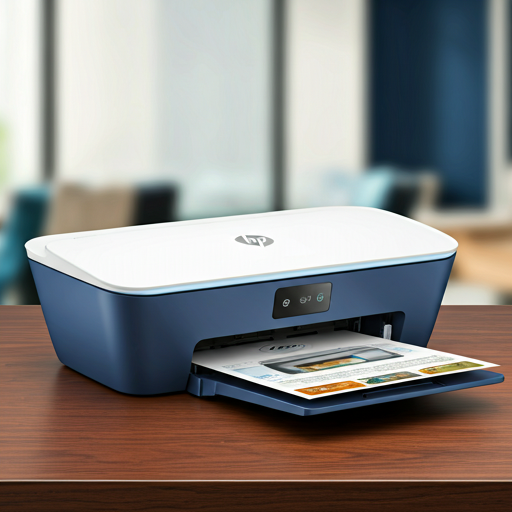
The HP DeskJet 2720e is a compact all-in-one color inkjet printer with wireless connectivity and HP+ cloud features for convenient home printing. This guide covers complete setup instructions, WiFi configuration options, cartridge management, and troubleshooting solutions for optimal performance.
Product Setup
Connect Printer to Power & Enter AWC Mode
Power on your HP DeskJet 2720e and ensure it enters Auto Wireless Connect (AWC) setup mode, indicated by a blinking blue light next to the Wireless button. The printer will search for the HP Smart app within two hours of initial power-on.
Download & Open HP Smart App
Install the HP Smart app on your iOS, Android, Windows, or Mac device. Ensure Bluetooth is enabled on mobile devices for faster setup. Open the app and tap the Plus icon to begin adding your printer to your wireless network.
Select Your WiFi Network & Complete Setup
Choose your wireless network from the app and enter your WiFi password. The printer will connect and display a steady blue Wireless button light once successfully connected. You can then configure HP+ features and receive firmware updates automatically.
Install Original HP 67 or 67XL Cartridges
Open the cartridge access door and install the black and tri-color HP 67 cartridges, ensuring the plastic protective tape is removed. Press down firmly until cartridges click into place, then close the access door to begin printing.
Pro-Tip: Do not touch the copper-colored contacts or the ink nozzles. Touching these parts can result in clogs, ink failure, and bad electrical connections.
WiFi Connection Guide
WiFi with Router (WPS Method)
Press and hold the Wireless button for 3+ seconds, then press your router's WPS button within 2 minutes. The Wireless light will glow steady blue when connected successfully. Supports both 2.4 GHz and 5 GHz networks.
WiFi Direct (No Router Required)
Press and hold Wireless + Resume buttons for 3 seconds to enable WiFi Direct. Connect up to 5 devices directly to your printer using the WiFi Direct name (DIRECT-**-HP DeskJet 2700e series) and password printed on the information page.
Troubleshooting FAQ
Paper Jam in Input Trayexpand_more
WiFi Connection Fails or Dropsexpand_more
Cartridge Error or Low Ink Warningexpand_more
Poor Print Quality or Faded Colorsexpand_more
Printer Not Printing Despite Wireless Connectionexpand_more
Important Safety Instructions
- Always turn off the printer using the Power button and wait for all internal sounds to stop before unplugging to protect cartridges from drying out
- Store HP 67 cartridges at room temperature (15-35°C / 59-95°F) in original sealed packaging until installation to prevent ink evaporation
- Do not clean the printhead unnecessarily as this wastes ink and shortens cartridge life; only clean when print quality becomes unacceptable
- Check estimated ink levels regularly from the control panel Ink Level icons or HP Smart app—replace cartridges before quality degradation occurs
- Transport the printer flat only; never place on its side, back, front, or top, and keep cartridges installed to prevent ink leakage
Replacement Ink Cartridges
The HP DeskJet 2720e printer uses genuine HP 67 / HP 67XL ink cartridges. Select your cartridge below to purchase replacement cartridges on Amazon:
Technical Specifications
| Feature | Specification |
|---|---|
| Cartridge Types | HP 67 (Standard) / HP 67XL (High Yield) - Black and Tri-color |
| Connectivity | Wireless 802.11b/g/n (2.4 GHz & 5 GHz), WiFi Direct, USB 2.0 High Speed, Ethernet support |
| Wireless Setup Methods | HP Smart app, WPS (Push Button & PIN), HP Printer Software, WiFi Direct |
| HP+ Cloud Features | Automatic firmware updates, remote printer management, ink delivery alerts, cloud-connected services (requires continuous Internet connection) |
| Print Speed | Varies according to document complexity; speeds optimized for standard documents |
| WiFi Direct Capacity | Up to 5 computers and mobile devices can connect simultaneously |
| USB Cable Length | Recommended maximum 3 m (10 feet) to minimize electromagnetic interference |
| Supported Paper Weights | Defined in technical specifications; use original HP paper or ColorLok® certified equivalents |
| Auto-Off Feature | Automatically turns off after 2 hours of inactivity to reduce energy consumption |
| Related Models | 2700e, 2710e, 2721e, 2722e, 2723e (share similar specifications and cartridges) |